You can now keep Ontario vaccine QR codes in your Apple Wallet, and here’s how
ਵੈਕਸੀਨ ਦੇ QR ਕੋਡ ਹੁਣ ਤੁਹਾਡੇ Apple Wallet ਵਿੱਚ ਕੀਤੇ ਜਾ ਸਕਦੇ ਹਨ ਸਟੋਰ, ਜਾਣੋ ਕਿਵੇਂ
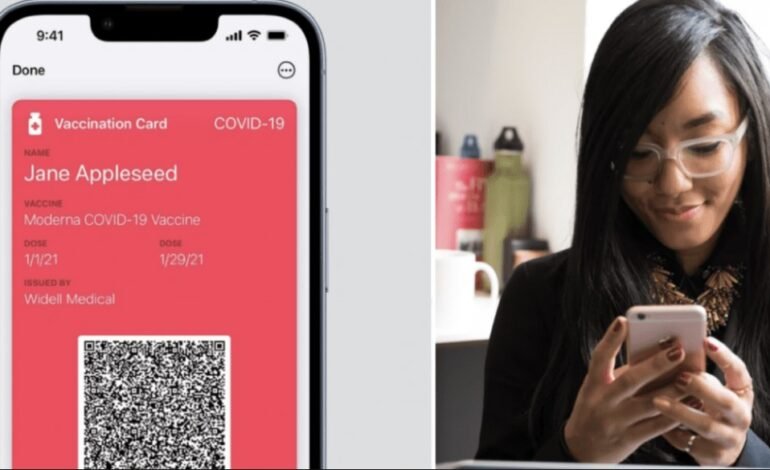
According to the government, Ontarians with Apple mobile devices can now upload their proof-of-vaccination QR code to their Apple Wallet.
The capability is now accessible for users of Apple’s newest iPhone operating system, iOS 15.1, which was released this week.
According to the government, QR codes can now be kept in your Apple Wallet or Apple Health app.
This is how you do it:
- On a computer desktop, open your improved certificate with a QR code, or print it off.
- Activate the iPhone camera
- Activate the camera and point it at the QR code.
- The phone will scan the QR code once it is in focus and in the centre of the phone screen.
- Users will be requested to store the code to Apple Wallet and Apple Health once the phone has scanned it.
Individuals who already have their vaccination certificate in Apple Health can add it immediately to Apple Wallet, according to the authorities.
The phone will scan the QR code once it is in focus and in the centre of the phone screen.
Users will be requested to store the code to Apple Wallet and Apple Health once the phone has scanned it.
Individuals who already have their vaccination certificate in Apple Health can add it immediately to Apple Wallet, according to the authorities.
ਸਰਕਾਰ ਦਾ ਕਹਿਣਾ ਹੈ ਕਿ ਐਪਲ ਮੋਬਾਈਲ ਡਿਵਾਈਸਾਂ ਦੀ ਵਰਤੋਂ ਕਰਨ ਵਾਲੇ ਓਨਟਾਰੀਅਨ ਹੁਣ ਆਪਣੇ ਐਪਲ ਵਾਲਿਟ ਵਿੱਚ ਟੀਕਾਕਰਨ ਪਰੂਫ QR ਕੋਡ ਸ਼ਾਮਲ ਕਰ ਸਕਦੇ ਹਨ।
ਇਹ ਵਿਸ਼ੇਸ਼ਤਾ ਹੁਣ ਐਪਲ ਦੇ ਸਭ ਤੋਂ ਨਵੇਂ ਓਪਰੇਟਿੰਗ ਸਿਸਟਮ iPhones, iOS 15.1 ਦੀ ਵਰਤੋਂ ਕਰਨ ਵਾਲੇ ਲੋਕਾਂ ਲਈ ਉਪਲਬਧ ਹੈ, ਜੋ ਇਸ ਹਫਤੇ ਲਾਂਚ ਹੋਇਆ ਸੀ।
ਸਰਕਾਰ ਦਾ ਕਹਿਣਾ ਹੈ ਕਿ QR ਕੋਡ ਹੁਣ ਤੁਹਾਡੇ ਐਪਲ ਵਾਲਿਟ ਜਾਂ ਐਪਲ ਹੈਲਥ ਐਪ ਵਿੱਚ ਸਟੋਰ ਕੀਤੇ ਜਾ ਸਕਦੇ ਹਨ।
ਇਹ ਕਿਵੇਂ ਕਰਨਾ ਹੈ:
- ਕੰਪਿਊਟਰ ਡੈਸਕਟਾਪ ‘ਤੇ QR ਕੋਡ ਨਾਲ ਜਾਂ ਇਸ ਨੂੰ ਪ੍ਰਿੰਟ ਕਰਕੇ ਆਪਣੇ ਵਿਸਤ੍ਰਿਤ ਸਰਟੀਫਿਕੇਟ ਨੂੰ ਖੋਲ੍ਹੋ
- ਆਈਫੋਨ ਕੈਮਰਾ ਖੋਲ੍ਹੋ
- ਕੈਮਰੇ ਨੂੰ QR ਕੋਡ ਵੱਲ ਪੁਆਇੰਟ ਕਰੋ
- ਇੱਕ ਵਾਰ ਜਦੋਂ QR ਕੋਡ ਫੋਕਸ ਵਿੱਚ ਹੁੰਦਾ ਹੈ ਅਤੇ ਫ਼ੋਨ ਸਕ੍ਰੀਨ ‘ਤੇ ਕੇਂਦਰਿਤ ਹੁੰਦਾ ਹੈ, ਤਾਂ ਫ਼ੋਨ ਇਸਨੂੰ ਆਪਣੇ ਆਪ ਸਕੈਨ ਕਰੇਗਾ
- ਜਦੋਂ ਫ਼ੋਨ ਕੋਡ ਨੂੰ ਸਕੈਨ ਕਰਦਾ ਹੈ, ਤਾਂ ਉਪਭੋਗਤਾਵਾਂ ਨੂੰ ਇਸਨੂੰ ਐਪਲ ਵਾਲਿਟ ਅਤੇ ਐਪਲ ਹੈਲਥ ਵਿੱਚ ਸੇਵ ਕਰਨ ਲਈ ਕਿਹਾ ਜਾਵੇਗਾ
ਸਰਕਾਰ ਦਾ ਕਹਿਣਾ ਹੈ ਕਿ ਜਿਨ੍ਹਾਂ ਵਿਅਕਤੀਆਂ ਕੋਲ ਪਹਿਲਾਂ ਹੀ ਐਪਲ ਹੈਲਥ ਵਿੱਚ ਵੈਕਸੀਨ ਸਰਟੀਫਿਕੇਟ ਹੈ, ਉਹ ਇਸਨੂੰ ਸਿੱਧੇ ਐਪਲ ਵਾਲਿਟ ਵਿੱਚ ਸ਼ਾਮਲ ਕਰ ਸਕਦੇ ਹਨ।